
Key Takeaways:
- This guide compares six storyboard software tools used in animation, film, video production, and marketing.
- Each tool is evaluated by core features, ideal user type, and pricing model.
- The recommendations map specific creative workflows to the most suitable software.
What Storyboard Software Does
Storyboard software converts narrative ideas into structured visual sequences. These tools help creators plan shots, define pacing, and align teams before production begins. By visualizing scenes early, teams reduce revisions, production delays, and communication gaps.
Storyboard software supports:
- Shot planning and sequencing
- Visual continuity across scenes
- Collaboration between creative and production roles
For workflows that extend into 3D production, storyboards often feed directly into blockouts and camera planning, as outlined in this guide on blockout in Blender.
How This List Was Selected
The following storyboard tools were chosen based on:
- Ease of use and learning curve
- Feature depth for visual planning
- Collaboration and export options
- Pricing accessibility for different skill levels
Each entry includes a clear use case to support direct comparison.
If you are evaluating broader animation tools alongside storyboard software, see this comparison of best 3D animation software and best 2D animation software.
1. Canva – The Versatile Design Platform
Overview
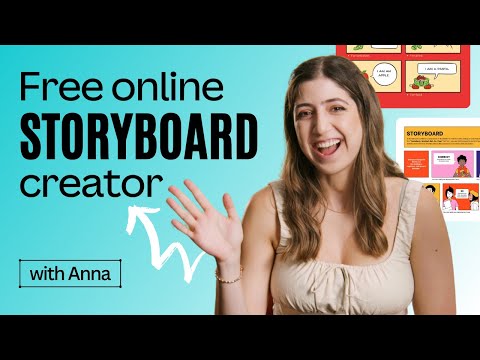
Canva is a cloud-based design platform that includes storyboard templates and layout tools. It focuses on speed, accessibility, and collaboration rather than advanced drawing or animation control.
Core Features
- Prebuilt storyboard templates
- Drag-and-drop layout editor
- Real-time collaboration
- Stock image and icon library
Ideal Users
Educators, marketers, and content creators producing marketing or explainer videos. Canva pairs well with animation-driven campaigns such as those described in why you should use animation for marketing.
Pricing
Free plan available. Paid plans unlock expanded assets and collaboration features. You can access Canva here.
2. Storyboard That
Overview
Storyboard That is a web-based storyboard creation tool designed for scene construction using characters, backgrounds, and props. It emphasizes structure over freehand drawing.

Core Features
- Scene-based storyboard panels
- Character and prop libraries
- Flexible grid layouts
- Educational resources and templates
Ideal Users
Teachers, students, and professionals creating instructional content or narrative breakdowns. This approach aligns well with early-stage visual planning before moving into full production tools such as those covered in all about visual effects.
Pricing
Subscription plans start at $9.99 per month. Education discounts available. You can access Storyboard That here.
3. StudioBinder – Professional Production Management
Overview
StudioBinder connects storyboarding with production management. It links visual planning to shot lists, schedules, and call sheets, making it suitable for real-world production environments.

Core Features
- Shot-based storyboard editor
- Integrated production planning tools
- Team collaboration and permissions
- Export for production workflows
Ideal Users
Film crews and commercial video teams managing logistics alongside creative planning. StudioBinder fits naturally into pipelines that involve professional camera work and shot execution, similar to workflows discussed in best visual effects software.
Pricing
Plans start at $29 per month. You can access StudioBinder from here.
4. Storyboarder by Wonder Unit
Overview
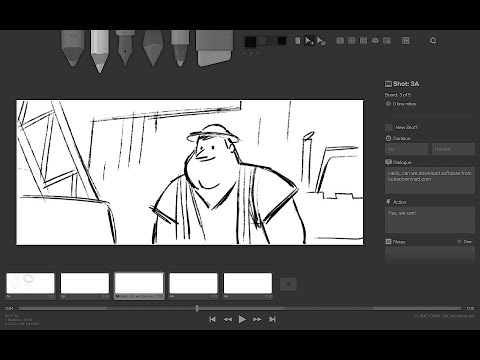
Storyboarder is a free, open-source desktop application built for fast visual ideation. It focuses on speed and clarity rather than polish.
Core Features
- Freehand drawing tools
- Timeline and shot duration control
- Simple 3D shot generator
- PSD and video export options
Ideal Users
Independent creators and animators who want to sketch ideas quickly before committing to full scene builds. Many users transition from Storyboarder into Blender-based workflows such as camera setup and scene blocking, covered in quickest way to point a camera in Blender.
Pricing
Free. Download Storyboarder here.
5. Storyboard Pro by Toon Boom
Overview
Storyboard Pro is a professional storyboard and animatic tool widely used in animation studios. It combines drawing, camera movement, and timeline control.

Core Features
- Advanced drawing and brush engines
- Camera moves and shot transitions
- 3D object and camera integration
- Animatic and sound support
Ideal Users
Professional storyboard artists and animation studios producing episodic or cinematic content. Storyboard Pro integrates well with advanced animation pipelines such as those discussed in best Blender addons for animation.
Pricing
Subscription at $68 per month or $530 per year. You can access Storyboard Pro here.
6. Blender
Overview
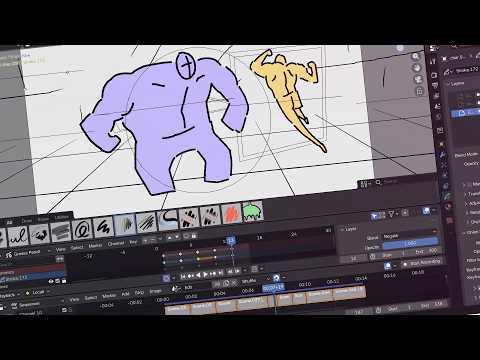
Blender is a full 3D creation suite that supports storyboarding through Grease Pencil and camera blocking. It connects storyboards directly to 3D scenes.
Core Features
- Grease Pencil for 2D storyboard sketches
- Full 3D camera and scene blocking
- Timeline and animation tools
- Direct transition from storyboard to production
Ideal Users
Animators and technical artists who want storyboards to evolve into final assets. Blender excels when storyboards lead into tasks like camera calibration, animation, and rendering, including workflows explained in how to animate a car in Blender and how to render an animation as video in Blender.
Pricing
Free and open source. You can download Blender here.
How to Choose the Right Storyboard Software
Choose storyboard software based on workflow requirements:
- For speed and simplicity, use Canva or Storyboard That.
- For structured production planning, use StudioBinder.
- For free creative control, use Storyboarder or Blender.
- For studio-level production, use Storyboard Pro.
For creators planning full pipelines from concept to final render, storyboard tools work best when combined with production techniques such as those covered in Blender software overview.